"How Should I Move Data from My Source Systems into Fabric? Right Data Strategy"
Updated: 3 days ago
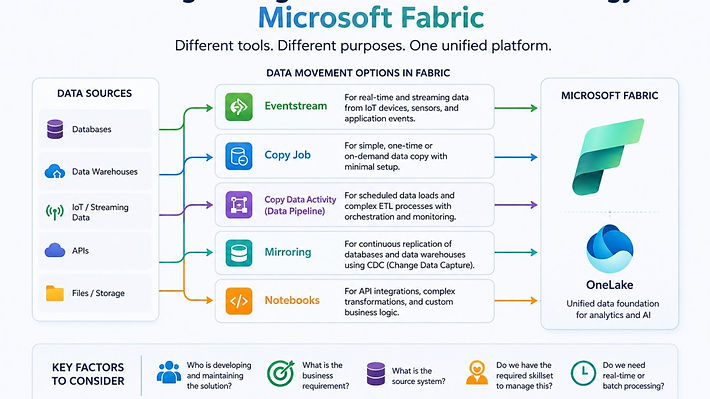
Microsoft Fabric provides multiple data ingestion options. Each serves a different purpose. The right choice depends on your business requirements, source system, and the skills available within your team.
Questions to Ask Before Choosing an Ingestion Method - What is the right data strategy for movement
Before selecting a data movement strategy, ask yourself:
What problem am I trying to solve?
What is the source system?
Who will develop and maintain the solution?
Does the team have the required technical skills?
Do I need real-time or batch data processing?
The answers to these questions will guide you in selecting the most suitable approach.
Eventstream
Use Eventstream when dealing with real-time or streaming data.
Best for:
IoT devices
Sensor data
Application events
Real-time monitoring
If data is continuously generated and needs to be processed immediately, Eventstream is a great choice.
Copy Job
Copy Job is a low-code option for moving data into Fabric.
Best for:
Simple data ingestion
Quick setup
Basic integration requirements
It is ideal when you need a fast and easy way to bring data into Fabric.
Copy Data Activity (Data Pipeline)
Data Pipelines provide more control and flexibility than Copy Jobs.
Best for:
Scheduled data loads
ETL processes
Enterprise data integration
Choose Data Pipelines when your solution requires orchestration, scheduling, and monitoring.
Mirroring
Mirroring continuously replicates data from supported source systems into OneLake using Change Data Capture (CDC).
Best for:
Databases
Data warehouses
Reporting and analytics workloads
Mirroring reduces maintenance effort and keeps data synchronized automatically.
Notebooks
Notebooks offer the highest level of flexibility.
Best for:
API integrations
Complex transformations
Custom business logic
Although code-heavy, notebooks are often the preferred choice when dealing with complex data structures and advanced processing requirements.
Quick Example
Imagine a company already has its operational data stored in a database. They want near real-time reporting in Microsoft Fabric without building ETL pipelines. In this scenario, Mirroring is often the best choice. It automatically keeps the data synchronized and minimizes maintenance effort.
Final Thoughts
There is no one-size-fits-all approach to data ingestion in Microsoft Fabric. The right choice depends on your business requirements, source systems, and team capabilities. Whether it's Eventstream for real-time data, Copy Job for simple ingestion, Data Pipelines for ETL processes, Mirroring for database replication, or Notebooks for complex integrations, selecting the right tool will help you build a scalable and efficient data platform.
Looking for More Real-World Scenarios?
Microsoft provides a detailed decision guide with multiple real-world examples. This can help you choose the right data movement strategy based on your specific use case. For more scenarios and guidance, visit:
Need Help Implementing This Architectural Framework?
Check out our services:
Understanding the Importance of Data Ingestion
Data ingestion is a crucial step in the data lifecycle. It sets the stage for effective data analysis and decision-making. With the right ingestion method, you can ensure that your data is accurate, timely, and relevant.
The Role of Data Quality
Data quality directly impacts your analytics outcomes. Poor-quality data can lead to misguided decisions. Therefore, it’s vital to implement measures that ensure data integrity during the ingestion process.
Choosing the Right Tools
Selecting the right tools for data ingestion is essential. Each tool has its strengths and weaknesses. Understanding these will help you make informed decisions.
Future-Proofing Your Data Strategy
As technology evolves, so should your data strategy. Future-proofing involves choosing scalable solutions that can adapt to changing business needs. Microsoft Fabric offers such flexibility, allowing you to grow without losing efficiency.
Conclusion
In conclusion, the data ingestion process is foundational for any analytics strategy. By carefully considering your options and aligning them with your business goals, you can create a robust data architecture. This will empower you to turn your data into a competitive advantage and drive intelligent decisions.


Comments